
For a long time, designers worked in Figma, handed everything over to developers, and waited to see the design implemented. AI-assisted coding and no-code tools are blurring that boundary.
Here is how we use Claude, Cursor, Storybook and Webflow at Excited to take components, prototypes and websites closer to production, and what that shift means for product designers.
For a long time, the boundary between design and development was pretty clear. Designers worked in Figma, prepared prototypes and documentation, handed everything over to developers, and then waited to see the design implemented in a real product.
That Boundary Is Becoming Less Obvious
AI-assisted development allows designers to turn ideas into working code much faster, while no-code and low-code tools make it possible to build and publish certain products without a traditional development process at all.
At Excited, we are already seeing this shift in our everyday work. We still use Figma as the core of our product design process, but it is no longer necessarily the last place where designers work before handoff. We use AI-assisted coding for prototypes and component implementation, and tools like Webflow allow us to take websites much further, sometimes all the way from design to production.
The interesting part isn’t simply that these tools make us faster. They are changing how we design, how we collaborate with developers, and how much responsibility designers can take for the final result.
Let’s look at what that means in practice.
The Gap Between Figma and Production
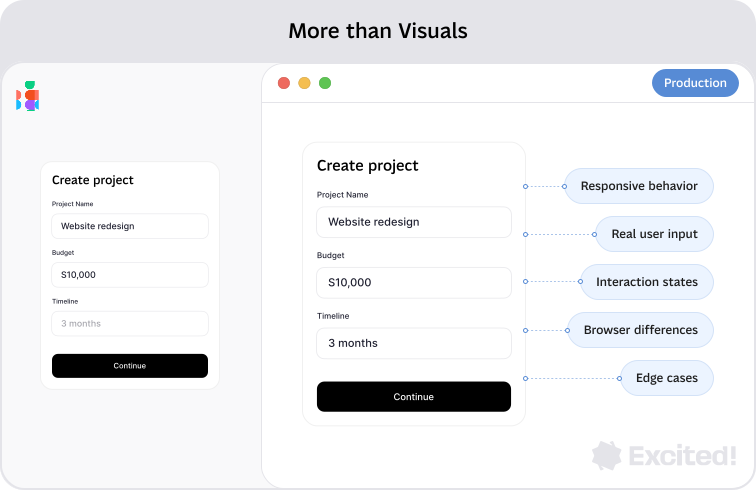
Figma is great for communicating how a product should look and behave, but it’s still a representation of the final experience. Responsive behavior, complex interactions, real data, and edge cases often become clear only when a design starts behaving like a real product.
AI and no-code tools are making it easier to explore these details earlier. Instead of only describing how something should work, designers can increasingly build, test, and refine ideas closer to production.
From Figma Components to Real Components
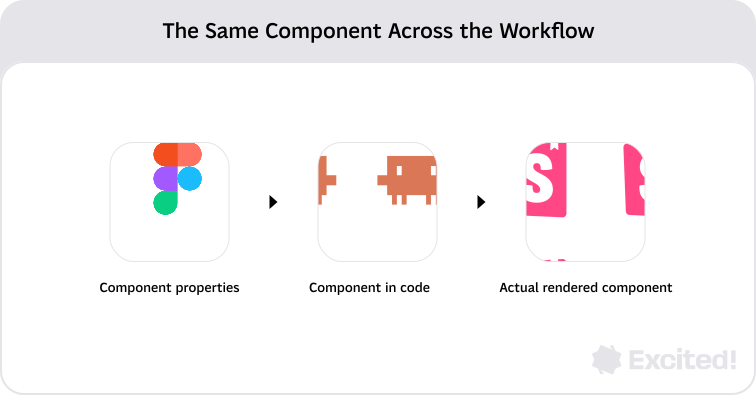
Components are at the core of how we design digital products. In Figma, they help us create consistent interfaces, define variants and states, and build scalable design systems. But those components also need to exist in code.
At Excited, we’ve started bringing these two sides closer together. We use AI-assisted tools such as Claude and Cursor to take components from Figma into code, then work with developers to review and refine their implementation in Storybook.
This gives us a shared space where designers can see how components actually behave, compare them with the original design, and catch differences in states, variants, and responsive behavior earlier.
The goal isn’t to replace developers or generate production-ready code automatically. It’s to create a stronger connection between the component we design in Figma and the component that ultimately exists in the product.
What Becomes Possible with AI Prototyping
Once components exist in code, they can also become the foundation for more realistic prototypes.
Instead of recreating every interaction from static frames, designers can combine coded components into working flows and test them in an environment that behaves much closer to the actual product.
This is particularly useful for things like:
- dynamic interactions and changing interface states;
- complex multi-step workflows;
- responsive behavior;
- animations and micro-interactions;
- realistic content and data;
- role-based experiences;
- edge cases;
- concepts that need to feel like a real product during a client or investor presentation.
For some projects at Excited, this means a prototype is no longer simply a collection of clickable screens. We can create something that behaves much closer to the actual product and share it with clients or potential users before committing significant development resources.
Instead of asking someone to imagine what will happen after clicking a button, we can let them click it. And once people can interact with something, the feedback becomes much more concrete.
Designing Components Differently When You Understand the Implementation
When you only see a component in Figma, it’s easy to focus primarily on its visual appearance. Once you start working with its implementation, other questions become harder to ignore.
What states does this component actually have? Which properties should be configurable? Is this really a new component or another variant? What happens with longer content or missing data? How should it behave across screen sizes?
These are development questions, but they’re also design questions.
The challenge shifts from “Can I build this?” toward “Do I understand what should be built well enough to evaluate the result?”
Low-Code and No-Code Bring Designers Closer to Production
AI-assisted coding isn’t the only way designers are getting closer to the final product. Low-code and no-code tools create another path by allowing designers to work more directly with the medium in which the experience will eventually live.
No-code platforms allow designers to build digital experiences visually without writing code, while low-code tools leave room for custom code when more flexibility is needed. Today, these tools cover much more than simple landing pages:
- Webflow and Framer for building responsive websites and interactive experiences;
- Bubble for creating web applications with workflows, databases, and application logic;
- Adalo for visual development of web and mobile applications;
- Glide for data-driven applications built through a visual interface.
For designers, this means there are now different ways to move beyond static design depending on what we’re building: from a marketing website to a functional application.
{{{{service-card}}}}
Webflow as Part of Our Design Process
At Excited, we’ve used Webflow to build and launch client websites, not just design them.
Instead of our work ending once a website is approved in Figma, we can continue working directly with responsive layouts, reusable components, CMS content, interactions, and animations in Webflow.
Working in the final medium also makes issues visible earlier. Real content can break a layout, responsive behavior needs to work between the breakpoints designed in Figma, and animations can feel very different in an actual browser.
Being able to see and refine these details directly gives designers more control over the final experience and makes iteration much more immediate.
In this case, no-code isn’t simply a faster way to build a website. It allows design and implementation to become part of the same iterative process.
{{case-study}}
What This Shift Means for Product Designers
Designers Don’t Need to Become Developers
AI makes it easier for designers to work with code, but that doesn’t mean every designer needs to become a frontend engineer.
What matters more is technical literacy: understanding components, states, design tokens, responsive behavior, and the basics of how a product is implemented. This helps designers give AI better instructions, evaluate generated results, and communicate more effectively with developers.
AI can generate code quickly, but it still requires judgment. The valuable skill isn’t writing every line of code yourself. It’s understanding enough to know whether the result is right.
AI and No-Code Still Have Limits
These tools can bring designers much closer to production, but they don’t fit every project.
- AI-assisted code: great for prototypes, exploration, and speeding up implementation, but complex architecture, security, performance, and maintainability still require engineering expertise.
- Low-code/no-code: great for websites and content-driven experiences, but customization, scalability, and platform constraints can become limitations.
- The right approach depends on the problem: sometimes Figma is enough, sometimes Webflow works best, and sometimes traditional development is the right choice.
The goal isn’t to remove development from the process, but to choose the right level of implementation for what we’re trying to build.
From Design to Greater Ownership
The most important change isn’t any particular AI or no-code tool. Tools will change, and the boundary of what they can generate will keep moving.
What matters is that designers now have more opportunities to participate beyond the design file: building, testing, refining, and understanding how their decisions work in the real product.
At Excited, Figma remains an essential part of our process. But depending on the project, we can now go further: bringing components into code, creating functional experiences with AI, or building and launching websites in Webflow.
Designers don’t need to own every stage, but they can now participate in more of them.
And when used intentionally, AI and no-code give designers something more valuable than speed: a better understanding of what we’re designing and more ownership over what users ultimately experience.
Artificial Societies, an AI social-simulation startup, partnered with our design team to design and build its Webflow website in two months.
Service short description